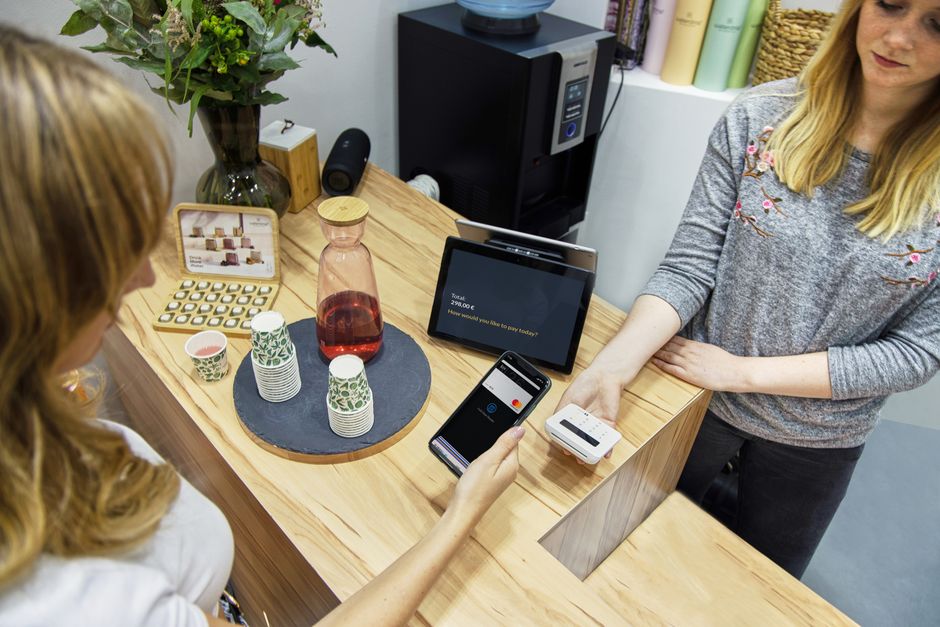
What Payment Methods Should an Online Shop Offer on Mobile?
In today’s mobile-first world, how you enable payments on your online shop can make or break the checkout experience. Customers expect fast, intuitive, and secure ways to pay right from their smartphones—no surprise there. But what does that actually mean when it comes to payment methods?
This post covers the essentials of “phone-first” checkout with a focus on digital wallets and saved payment methods, the importance of a streamlined mobile UX, and how biometrics can reduce friction. We’ll also break down the key payment options you shouldn’t overlook, including Visa, Mastercard, and PayPal.
Why Mobile Checkout Needs Its Own Strategy
Unlike desktops, where screen real estate and typing ease encourage multiple form fields and a slower checkout flow, mobile shopping demands speed and minimal friction. People typically use their phones while on-the-go, often in short bursts and with limited attention.
According to Google, 79% of smartphone users have made a purchase online using their mobile device in the last 6 months—but 70% of mobile shopping carts are abandoned. A big reason? Frustrating payment experiences.
Phone-First Expectations
- Fewer taps and shorter forms: Mobile checkouts must trim down the steps to payment entry.
- Clear pricing and totals: Shoppers want transparency so they don’t feel tricked by hidden fees or taxes.
- Fast loading and smooth navigation: Slow checkout pages deter mobile shoppers.
- Security without hassle: Users expect robust security but won’t tolerate complex multi-step identity checks.
Digital Wallets: The Cornerstone of Mobile Payments
Digital wallets such as Apple Pay, Google Pay, and Samsung Pay have become the dominant way mobile shoppers complete purchases because they deliver on convenience, security, and speed.
Why Digital Wallets Matter
- One-touch payments: Users can pay instantly without entering card numbers, expiration dates, or CVVs.
- Strong biometrics support: Face ID, Touch ID, or fingerprint sensors mean payments can be authenticated quickly and securely.
- Reduced input errors: Autofill from a wallet reduces typos that cause declined transactions.
- Built-in fraud protection: Tokenization ensures that payment information never directly exposes card details.
Most importantly, digital wallets support major card networks like Visa and Mastercard, ensuring broad acceptance. For example, Apple Pay works with both Visa and Mastercard credit or debit cards stored in the user's wallet.
Integrating Digital Wallets on Your Mobile Shop
Popular e-commerce platforms usually provide built-in support for Apple Pay and Google Pay, but it’s critical to verify:
- That your payment gateway supports wallet token transactions
- Your site’s SSL certificate is up to date (a requirement for wallet payments)
- The checkout button is clearly marked for digital wallets to catch users’ attention
Saved Payment Methods: Speed Without Surprises
While digital wallets offer instant payments, many shoppers still want to pay with NCSC mobile security checklist credit or debit cards directly on your website. The key here is to enable saved payment methods — letting returning shoppers store their Visa or Mastercard details securely for faster repeat purchases.
Benefits of Saved Payment Methods
- Fewer steps on return visits: Shoppers skip manual card entry and go straight to confirmation.
- Consistent experience: Saved cards integrate well with standard checkout flows, appealing to users who don’t use wallets.
- Customizable payment options: Stores can offer multiple saved cards, letting customers choose which Visa or Mastercard to charge.
- Compliance with PCI-DSS: Modern payment processors tokenize saved cards, so you never store card data yourself, lowering security risks.
How to Make Saved Payment Methods Work on Mobile
Design your mobile checkout to show saved cards prominently with card type logos (for example, Visa or Mastercard icons) and expiry dates. Include an option to add or delete cards easily. Always https://highstylife.com/booking-accommodation-on-mobile-the-safest-way-to-pay/ ask for the CVV on fresh card saves or periodically on stored cards for security without added friction.
PayPal: A Trusted Alternative for Mobile Payments
PayPal remains a powerhouse for online payments, especially when targeting users who may not want to input card details or who prefer PayPal’s buyer protection.
Why Keep PayPal on Mobile
- Large user base: Many consumers have PayPal accounts already linked to cards or bank accounts.
- One-step login and pay: PayPal offers a quick checkout button, reducing form filling.
- Mobile-friendly apps: PayPal’s native app integrates biometrics, complementing your shop’s checkout security.
Make sure your mobile checkout offers a clearly visible PayPal button next to other payment methods. Clarify if the PayPal button covers both PayPal wallet payments and PayPal Credit options, if applicable.
Mobile UX Tips: Keep It Simple, Clear, and Fast
Beyond payment options, the checkout interface itself matters hugely on mobile. Here’s how to optimize it:
- Minimize steps: Avoid unnecessarily splitting checkout into too many screens. Where possible, combine shipping, payment, and review steps.
- Show clear totals: Display the full price—item costs, shipping, taxes, and discounts—early and updated in real time.
- Use large, thumb-friendly buttons: Especially for key actions like “Pay with Visa” or “PayPal Checkout.”
- Avoid forcing keyboard shifts: Use numeric keypads for CVVs or expiration dates, minimizing typing errors.
- Visual progress indicators: Let users know where they are in the payment flow.
Biometrics: Reducing Friction Without Compromising Security
Biometric authentication (fingerprint, Face ID) is now embedded in most smartphones and widely adopted by digital wallet apps. This tech lets users authenticate quickly without typing passwords or one-time codes.
By supporting biometrics, your mobile shop can:

- Speed up authorization: Users pay in a fraction of the usual time.
- Mitigate fraud risk: Biometrics tie the transaction to the user’s physical identity device.
- Reduce cart abandonment: Fewer hurdles mean more completed checkouts.
If your payment gateway or wallet integration supports biometric authentication, highlight it in your UX—users love hearing “Secure payment with Face ID” or “Fingerprints accepted for faster checkout.”
Summary Table: Recommended Payment Methods for Mobile Shops
Payment Method Pros Cons Mobile Suitability Supports Visa/Mastercard? Apple Pay / Google Pay One-tap, biometric login, secure tokenization, broad card network support Device and browser dependent, requires wallet setup Excellent – designed for mobile Yes Saved Payment Methods (Credit/Debit Cards) Fast repeat checkouts, card choice, no external apps needed Needs secure processing, users must trust site security Very good with proper design Yes (Visa, Mastercard, AMEX, etc.) PayPal Trusted, wide user base, buyer protection, simple login Fees can be higher, external redirect may disrupt flow Good with dedicated PayPal button Yes (via stored cards or bank linked) Manual Card Entry (Visa, Mastercard) Universal acceptance Slow, error-prone on mobile, higher abandonment risk Poor – avoid if possible YesFinal Thoughts: The Mobile Payment Mix
In 2024, mobile shoppers expect a payment experience that’s swift, secure, and tailored to their device. That means your online shop should definitely offer:
- Digital wallets like Apple Pay and Google Pay for speed and biometric ease
- Saved payment methods, especially Visa and Mastercard cards, for returning customers who want convenience
- PayPal as a trusted alternative that covers users who prefer non-card wallets
Alongside these options, focus on a mobile-first checkout design with fewer steps, clear totals, and biometric authentication where possible. Put simply, the easier you make paying on phones, the higher your checkout completion rate will be.
Without these modern mobile payment methods, you risk frustrating customers, leading to abandoned carts and missed sales. But done right, your shop’s payment experience becomes a competitive advantage on the smallest screen with the biggest potential.